Sunday, August 6, 2017

Extending Datacap Add Document Dialog for entry templates

Hi there folks , iam back with a new blog entry for a new trick i have came across the past few days

as some of you do know that IBM provided a datacap navigator plugin that will install new custom actions that enable the user to add a new document using a scanner along with old the ways of adding a local document , an item or a document from an external url.

Once you choose to get a document from a scanner it will start the scanner module in the dialog and you can begin to scan document and edit them on the fly and append the document as a content item to the navigator object store.

this new dialog extends the original ecm/widget/dialog/AddContentItemDialog and adds the new capabilities mentioned above.


the problem we faced was with using this new custom dialog is that if you open the dialog and pass the entry template to it , the dialog opens without the option to add a document from a scanner as with the normal add document so i made a small trick that will do the needed and i thought a bout sharing it with you as a guideline for future customization

what i do is i made a new custom action for the entry templates so once you click on the entry template in the entry template feature i retrieve the content item of the entry template and then get the full entry template and pass it to the new addContentItemDialog of the datacap and here comes the interesting part:

i catch the widget of the content source type and prepare a new choice list for the widget then call the function of the widget to add the new choices and of course the widget will handle the change of the choicelist value

here is a code snippet :


lang.setObject("datacapCustomScanAction", function(repository, items, callback, teamspace, resultSet, parameterMap) {


this.repository = repository;
this.ETContentItem = items[0];
console.log("ETContentItem");
console.log(this.ETContentItem);
this.entryTemplate = repository.getEntryTemplateById(ETContentItem.id,ETContentItem.name,ETContentItem.objectStore);
console.log("this entryTemplate");
console.log(this.entryTemplate);
 
console.log("entry template NOTT retrieved!!");
//retrieve the setting for the entry templates then show the dialog
this.entryTemplate.retrieveEntryTemplate(dojo.hitch(this, function (retrievedEntryTemplate) {
      // Do something with retrievedEntryTemplate
console.log("retrievedEntryTemplate");
console.log(retrievedEntryTemplate);
console.log("This.Repository");
console.log(this.repository);
console.log("retrievedEntryTemplate.addClassName");
console.log(retrievedEntryTemplate.addClassName);
console.log("retrievedEntryTemplate.folder");
console.log(retrievedEntryTemplate.folder);
this.retrievedEntryTemplate = retrievedEntryTemplate;
if(this.addContentItemDialog){
this.addContentItemDialog.destroyRecursive();
}
this.addContentItemDialog = new AddContentItemDialog();
this.addContentItemDialog.setDefaultContentClass(retrievedEntryTemplate.addClassName);
this.addContentItemDialog.show (this.repository, null, true, false, null, null, true, retrievedEntryTemplate,false,null);
var choices = [];
if (this.addContentItemDialog._entryTemplate.allowSaveLocalDocument) {
choices.push("Document");
}
if (this.addContentItemDialog._entryTemplate.allowSavePropertiesOnly) {
choices.push("Item");
}
if (this.repository._isP8()) {
if (this.addContentItemDialog._entryTemplate.allowSaveExternalDocumentLink) {
choices.push("ExternalURL");
}
}
choices.push("Scanner");
this.addContentItemDialog.addContentItemGeneralPane.addContentSourceTypeChoices(choices);

 
   }), false, true);


});


Wednesday, July 12, 2017

Add Documents to Case SubFolder On Add Case Page - IBM Case Manager

Hi there guys , in a previous blog i provided a nice trick to add documents to a case directly after adding a new case ,check here : http://ecmmania.blogspot.ae/2017/06/add-documents-to-case-on-add-case-page.html

today i was playing a round and trying to understanding a bit further dojo deferred and promises and at last i found a trick to be able to add documents to a case subfolder directly after adding a new case,

the main problem in my old code is that you can only add docs to the root case folder not to a sub folder and by trying to use callbacks to retrieve the case sub folder then opening the dialog you can see that the chain is broken and the code won't execute and will break

this problem arises from the fact that you can make only one asynchronous call and then use the callback to retrieve the response and do something with it

 but using deferreds and promises i can do it now , the main ideas is to make like a chain of promises that depend on each other and once a promise is fulfilled the next promise will be triggered so i first make a deferred to get the case folder then another deferred to get the case sub folder and lastly i open a add content item dialog to add document to the case sub folder

i will leave you with the code , i wrapped it inside a function you can just call and pass the payload to it , you can also change the path of the subfolder that you want to store into or maybe create your custom add content item dialog and show it

addSubFolderDocs: function(payload) {
require(["dojo/Deferred", "dojo/dom", "dojo/on", "dojo/domReady!"],function(Deferred, dom, on){
 
var getCaseFolder = function(payload){

   var deferred = new Deferred();
var caseEditable = payload.caseEditable;
console.log("caseEditable");
console.log(caseEditable);
caseEditable.getCase().retrieveCaseFolder(function(parentCaseFolder){

deferred.resolve(parentCaseFolder);

});

return deferred.promise;

};

/*var showAddDocumentDialog = function(parentCaseFolder){

   var deferred = new Deferred();
var repositroy = parentCaseFolder.repository;
console.log("repositroy");
console.log(repositroy);
var addContentItemDialog = new ecm.widget.dialog.AddContentItemDialog();  
addContentItemDialog.show(repositroy, parentCaseFolder,true, false, function(addedItem){

addToSubFolder(addedItem);

}, null, false, null);


return deferred.promise;

};*/


var getSubFolder = function(parentCaseFolder){

   var deferred = new Deferred();
   console.log("parentCaseFolder");
   console.log(parentCaseFolder);
var rootPath = parentCaseFolder.attributes.PathName;
var fullPath = rootPath + "/" + "Leasing Documents";
parentCaseFolder.repository.retrieveItem(fullPath, function(subfolder){
   console.log("Subfolder");
   console.log(subfolder);
   deferred.resolve(subfolder);

}, null, null, null, null, null);

return deferred;
};


/*var folderRetrievedCB = function(subfolder,addedItem){
console.log("enter --> folderRetrievedCB <----this items to add");
console.log(addedItem);
console.log("enter --> folderRetrievedCB <----subfolder " + subfolder);
subFolder.moveToFolder(addedItem,addedItem.parent,function(response){
console.log("Response");
console.log("response");

});
subFolder.refresh(subFolder);
};*/


var executeFn = function(payload){

var getCaseFolderPromise = getCaseFolder(payload);
getCaseFolderPromise.then(function(parentCaseFolder){
     return getSubFolder(parentCaseFolder);
}).then(function(subfolder){

console.log("Promise Sub Folder");
console.log(subfolder);
console.log("Promise Repo ID");
console.log(subfolder.repository.repositoryId);
var repository = ecm.model.desktop.getRepository(subfolder.repository.repositoryId);
console.log("Promise repository");
console.log(repository);
var addContentItemDialog = new ecm.widget.dialog.AddContentItemDialog();  
addContentItemDialog.show(repository, subfolder,true, false, function(addedItem){

console.log("addedItem");
console.log(addedItem);

}, null, false, null);
});

};


executeFn(payload);


});


return payload;
}


Saturday, July 8, 2017

ICM 5.3.1 New Markup widget and Quick Tasks

in an update to the Awesome new IBM Case Manager Version 5.3.1 , Mr Dave Perman from IBM Team has shed light to 2 new features introduced in this version : The Markup Widget and the Quick Tasks

You Can check out the new Markup widget in this ECM Blog Entry
https://www.ibm.com/developerworks/community/blogs/e8206aad-10e2-4c49-b00c-fee572815374/entry/July_7_2017_at_8_43_23_PM?lang=en

and the New Quick Tasks in This blog entry
https://www.ibm.com/developerworks/community/blogs/e8206aad-10e2-4c49-b00c-fee572815374/entry/Announcing_the_Newest_Member_of_the_IBM_Case_Manager_Task_Family?lang=en

To be honest , i can't wait to get my hands on a virtual machine with the new version installed on it so i can start exploring it ☺😃😃

Wednesday, July 5, 2017

Build Your Own Customized ICN Eclipse Plug-in for IBM Content Navigator development

Hi there, a lot of times when you want to use the icn plugin jars to allow for icn plugin development Wizard appearing in eclipse New Project Wizard , you don't get the wizard working fine for each eclipse package as  the old jars ibm provided worked for certain eclipse packages only

IBM ICN Dev team has put a new project that you can use to get a customized jars for your own eclipse package then you can drop these new plugins in the dropins folder to get the icn plugin new project wizard when you create a new project

you can find the project and the details to how to customize it here in this ibm team repository along with instructions

https://github.com/ibm-ecm/ibm-content-navigator-samples/tree/master/eclipsePlugin

one small hint that could be useful:

during update bundle-version number for your Eclipse in MANIFEST.MF , you can't get the exact version by yourself so to get it automatically just press the old version written in the manifest file and press CTRL + SPACE that will get you the exact version for your eclipse

That's it

Enjoy :) 

Saturday, July 1, 2017

New IBM Case Manager v5.3.1 !

Announced just a few days ago

IBM Case Manager v5.3.1 Now Available!


 Thanks to Dave Perman from IBM team , he puplished 2 articles in the ECM Community Blog  where he provided a summary blog for the new features in this link

https://www.ibm.com/developerworks/community/blogs/e8206aad-10e2-4c49-b00c-fee572815374/entry/IBM_Case_Manager_v5_3_1_Now_Available?lang=en

and the great surprise is the new features they provided in the user interface found at this article

https://www.ibm.com/developerworks/community/blogs/e8206aad-10e2-4c49-b00c-fee572815374/entry/Styles_and_Layouts_in_IBM_Case_Manager_5_3_1?lang=en

A New Style , New widgets containers and markup widgets ^_^  and sure they provided a list of new exciting features still to be revealed !

still we need to see it in person to believe but it's a great step towards more friendly UI 

Way to Go IBM ! :) Keep it up 

Wednesday, June 21, 2017

Assigning users to a workflow group from a workflow step

hi there, a lot of times it's required for one user in the workflow to choose some users as the participants for the next step or for example a manager chooses a certain member or user to be responsible for a certain step by assigning this step to a workflow group and putting users inside this group

the old way was to collect users in a property and then assign the users to the workflow group inside of the process designer, with this new trick you can assign users from the case manager UI in any step and modify the list of users and groups inside the workflow group at any step

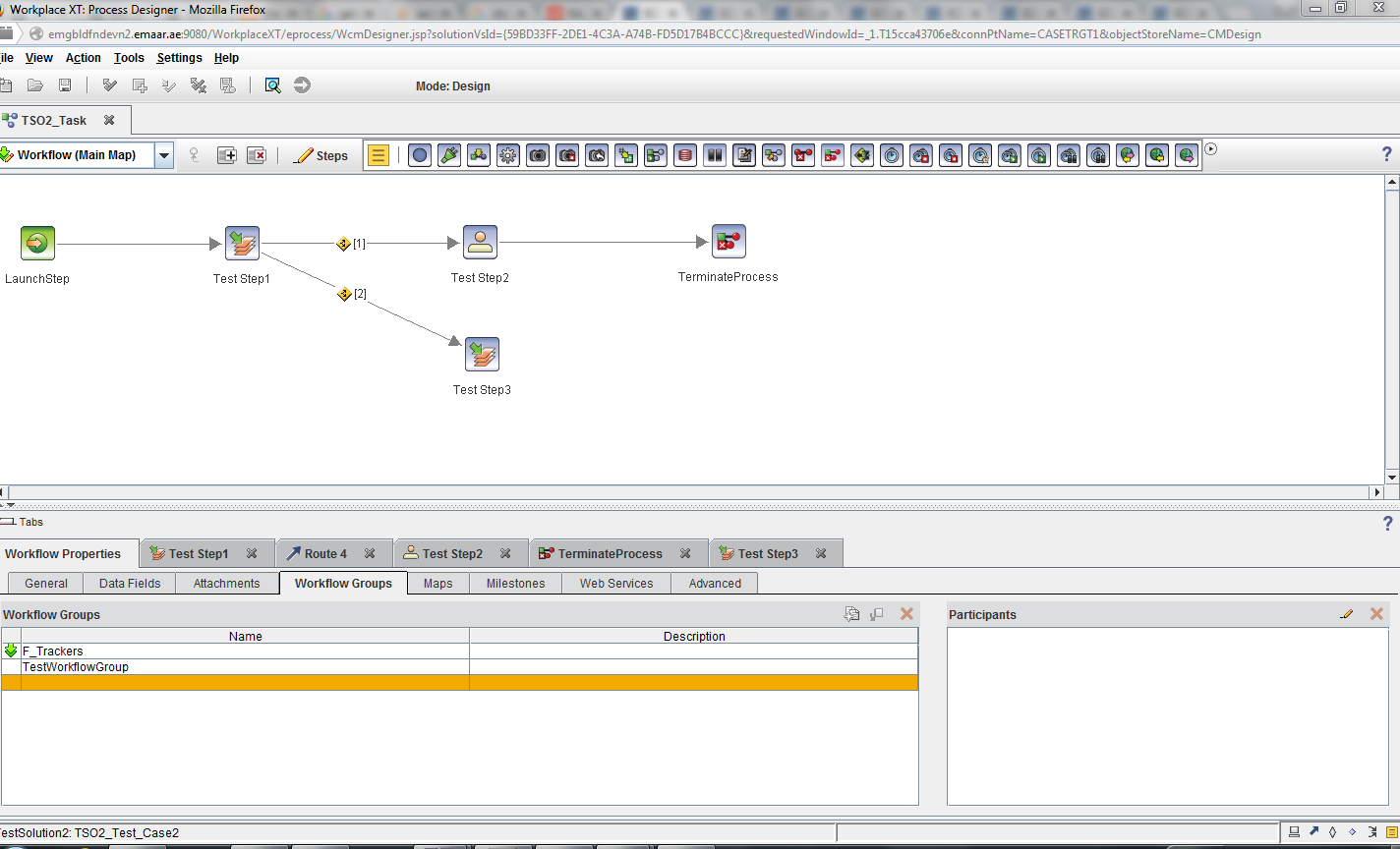
first step i will show you the workflow used for the testing:


in Test Step 1 we will assign some users to a workflow group called Test workflow group and then when we complete the step , a new step called Test Step 2 will be available for all users who are participants in Test Workflow Group


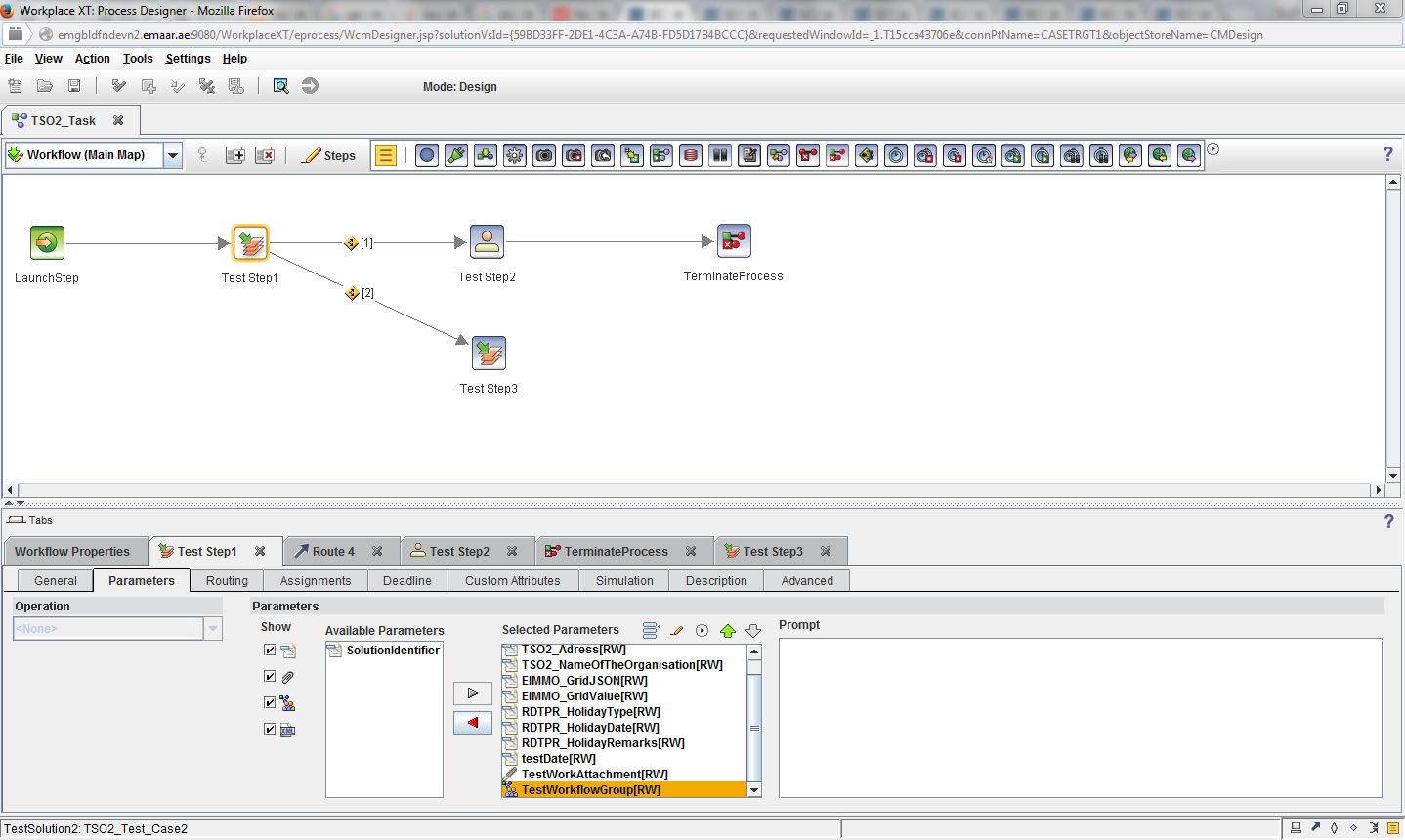
so in Test Step 1 we need to expose the workflow group as a parameter to the step so we can edit it

save the workflow and then create a new properties layout view


  • insert a run time only property , choose it as a workflow field property 
  • put the name of the workflow group which in our case is TestWorkflowGroup 
  • choose the type of property to be workflow group
  • insert all other options you want and save the view , use the view in a workdetails  page and assign this page to be the Step Processor for "Test Step 1"


deploy the solution and test, the result will be as follows


add any users to the workflow group and complete the step , you will see that the users added to the workflow group got a new step in their personal inbasket with name : Test Step 2

that's it and thanks :) 


Friday, June 16, 2017

ICN Custom Plugin Action to ICM Custom Action Trick

Hi there guys , i am back with a new small trick that i learned in the last few days,

a lot of times one will develop a low of custom actions using ICN custom plugin to use inside of the IBM content navigator interface and then the business will require us to move to using IBM case manager and reuse most of the components previously developed for ICN inside of the case manager,

the problem lies in the idea that the ICM Custom Actions are like the ICN Actions with some extra features and configurations like putting a label for the action that is different from the name of the action and also putting a message to be attached to the action as a helper and all of that is implemented as a new Action class of ICM inherting from the ICN Action Class and then extending the new features inside this class, so the old way of converting the ICN Custom Action to ICM Custom Actions was to create a punch of new ICM Actions and use the same code and that will allow for duplication of the same actions to just use them in ICM Widgets but i found that the only main difference is an extra configuration added to the ICN action and then VOILA !!

It's applied as follows : 

Go the the ICN Custom Action Java Class , and we will overide the implementation of  a function in the ICM Custom Java Class called : getAdditionalConfiguration()

the documentation of this function is as follows :
 /**
* Returns additional JSON that will appear on the ecm.model.Action
* JavaScript object for this action. This can be used to provide custom
* configuration information for the action as needed by plug-in provided
* JavaScript for the action.
* 
* @since 2.0.2
* @return an instance of JSONObject containing properties that will be
*         mixed into the ecm.model.Action object. The default
*         implementation returns an empty JSONObject.
*/  

so the idea is to formulate the configuration to be use as ICM Custom Action some we need to put some extra configurations that is :

ICM Compatible to be equal to True
Insert 2 properties for the action : label and message 
then you can use this action as a toolbar on menu action inside of the case manager widgets

the implementation of the function will be as follows : 

public JSONObject getAdditionalConfiguration(Locale locale) {
String jsonString = 
"{" +
"\"ICM_ACTION_COMPATIBLE\": true," +
"\"context\": null," +
"\"name\": \" Custom Action Name\"," +
"\"description\": \"Put Action Description\"," +
"\"properties\": [" +
"{" +
"\"id\": \"label\"," +
"\"title\": \"label\"," +
"\"defaultValue\": \"\"," +
"\"type\": \"string\"," +
"\"isLocalized\": false" +
"}," +
"{" +
"\"id\": \"message\"," +
"\"title\": \"message\"," +
"\"defaultValue\": \"\"," +
"\"type\": \"string\"," +
"\"isLocalized\": false" +
"}" +
"]}";
try {
return JSONObject.parse(jsonString);
} catch (IOException e) {
e.printStackTrace();
}
return null;
}


that's it , thanks and regards